Tuesday, 24 July 2012

Vertical Alignment of Text

When there is a requirement to show the values into horizontal or vertical alignment, then this post can do the miracle to the requirement.
All we need to do is we need to put the below piece of code in the Column Properties-->Use Custom CSS Style(checked)

Writing-mode: tb-rl; filter: flipv fliph;
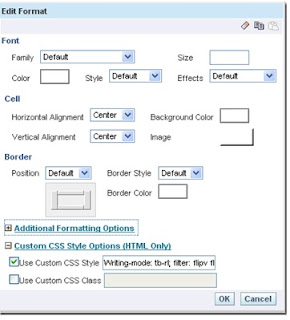

I have also put the below code by removing the flipv and fliph keywords in the above code
Writing-mode: tb-rl; filter: flipv;
Writing-mode: tb-rl; filter: fliph;


.


Comments are always welcome...

Monday, 23 July 2012

Right and Left Function in OBIEE

This is a basic report, but still wanted to make this post to show the results compared.
When we would need to use the left side or right side values from a column then we do have String Function-Right and Left Function
So in the column formula we can pull the String Functions-Right and Left function and check the Syntax.

Syntax-RIGHT(Column_name,integer) and LEFT(Column_name,integer)


And the result Comparison.


Comments are always welcome...

Sunday, 15 July 2012

Starting OBIEE in Linux and Unix

Startup the BI services

Set the BI_HOME to the Oracle BI Home path e.g. /opt/oracle/product/OracleBI

$export BI_HOME=/opt/oracle/product/OracleBI
#Start the BI sever
$$BI_HOME/setup/run-sa.sh start
#Start the presentation service
$$BI_HOME/setup/run-saw.sh-start
#Start the scheduler
$$BI_HOME/setup/run-sch.sh start
#Start the cluster controller – only required when BI servers clustered
$$BI_HOME/setup/run-ccs.sh start

Shutdown the BI services

$export BI_HOME=/opt/oracle/product/OracleBI
#Stop the cluster controller – only required when BI servers clustered
$$BI_HOME/setup/run-ccs.sh stop
#Stop the BI sever
$$BI_HOME/setup/run-sa.sh stop
#Stop the presentation service
$$BI_HOME/setup/run-saw.sh stop
#Stop the scheduler
$$BI_HOME/setup/run-sch.sh stop